Series: Deeptutor (4/7)
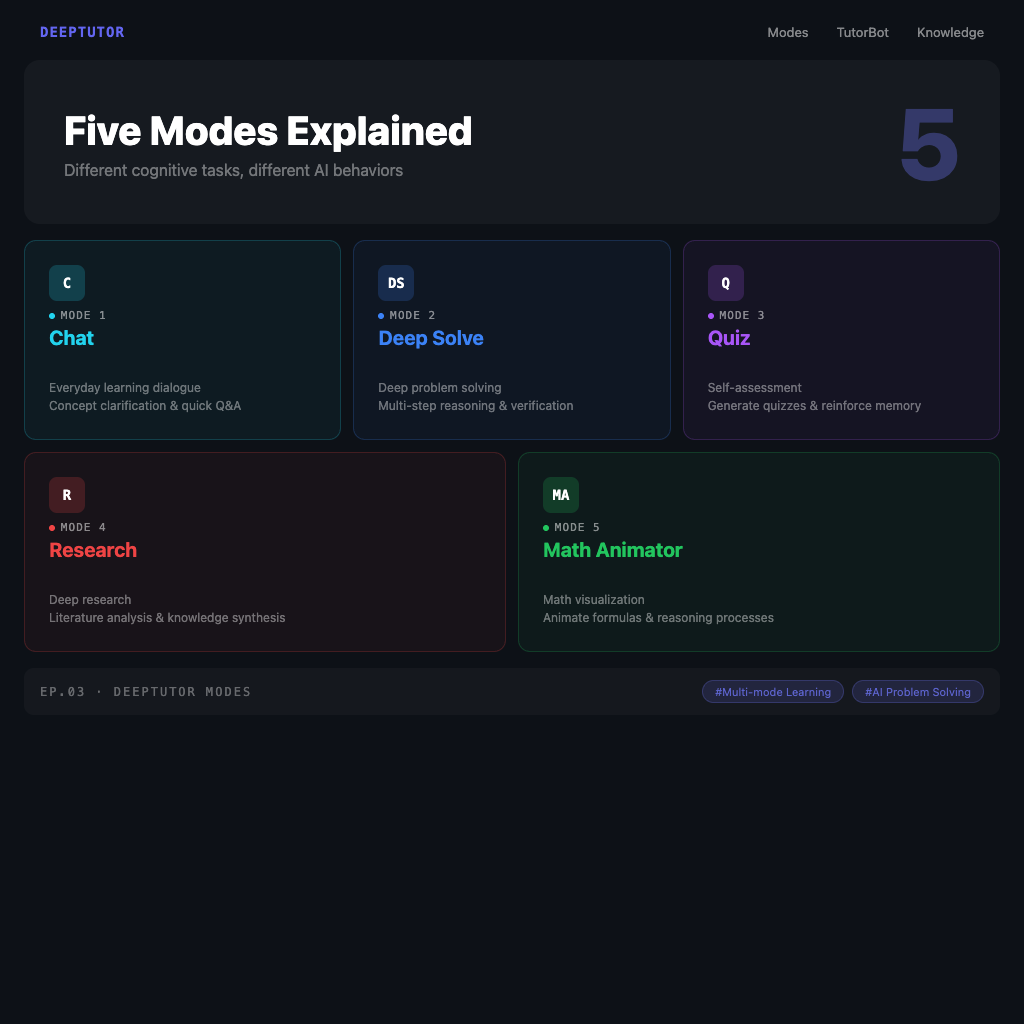
DeepTutor's Five Modes Explained: Chat, Deep Solve, Quiz, Research, Math Animator
DeepTutor's interface looks deceptively simple—just a conversation box. But inside that box, there are five completely different operating modes.
Most people start with the one they know best: Chat, asking questions and waiting for answers, just like ChatGPT. That's fine—but using only Chat is like buying a five-speed car and driving it exclusively in first gear.
This article breaks down all five modes—the design logic behind each, when to switch, and how to combine them for the best results.
The Core Logic of Mode Selection
Before diving in, one principle: different cognitive tasks require different AI behavior.
When you're trying to clarify a concept, you need guided conversation. When you're working through a complex math problem, you need multi-step verification. When you're testing whether you actually learned something, you need to be quizzed—not re-explained.
DeepTutor maps these different situational needs to five distinct mode designs.
Mode 1: Chat (Everyday Learning Conversation)
Best for: Concept clarification, quick Q&A, discussing ideas, building learning context
Chat is the foundational mode, but it's more than "talking to AI"—combined with DeepTutor's persistent memory, its conversation quality is a notch above generic AI chat tools.
Because DeepTutor knows your level and goals, Chat mode answers are automatically calibrated to your background. The same question gets different depths of answers for a beginner versus an advanced user.
Usage tip:
Tell DeepTutor your conversation goal, not just the question:
"I just finished studying the Attention mechanism in Transformers and want to verify my understanding.
My understanding is: Attention computes the similarity between a Query and all Keys,
then uses those similarities to weight the Values. Is that right? Where are my blind spots?"
This produces a far more precise response than just "explain the Attention mechanism."
Mode 2: Deep Solve (Multi-Agent Solution for Complex Problems)
Best for: Challenging technical problems, multi-step derivation problems, questions requiring cited sources
Deep Solve is DeepTutor's most powerful mode. It runs on multi-agent collaboration: the problem is decomposed into subtasks, different agents handle different aspects, and the result is synthesized into an answer with complete reasoning steps and citations.
The difference from directly asking ChatGPT lies in the verification steps—Deep Solve includes self-verification checkpoints throughout the derivation process, making it significantly more accurate than single-agent direct responses.
When to use it:
- Solving a multi-step math or programming problem
- Understanding design decisions and rationale behind a technical architecture
- Problems without a single correct answer that require multi-angle analysis
Usage tip:
Give Deep Solve enough context:
"This is a LeetCode Hard problem: [problem description]
My approach is [your current thinking], but I'm stuck at [specific step].
Please break the entire solution process down, show the reasoning at each step,
and give me a Python implementation at the end."
Deep Solve is slower than Chat—that's expected. Multi-agent collaboration takes time.
Mode 3: Quiz (Knowledge Testing and Self-Assessment)
Best for: Testing learning outcomes, identifying blind spots, exam preparation, memory reinforcement
The design logic behind this mode comes from the cognitive science concept of the Testing Effect: compared to re-reading, testing yourself produces significantly higher memory retention.
DeepTutor's Quiz doesn't generate random questions—it generates questions calibrated to your learning history and knowledge base content, at your current level. After you answer, it analyzes your thinking process rather than just telling you right or wrong.
How to use it:
"I just finished reading the Regularization chapter in machine learning.
Give me three multiple choice questions and two short answer questions at a medium-hard difficulty.
After I answer, help me identify which concepts I need to strengthen."
If you have a knowledge base uploaded, Quiz can also generate questions from your private documents:
"Based on my uploaded 'System Design Notes,'
give me five questions on CAP theorem and Consistency Models."
Usage tip:
After answering, don't just look at right or wrong—ask DeepTutor to analyze your reasoning:
"I picked B because I thought [your reasoning],
but the correct answer is C. Help me understand why my thinking was wrong."
This "where did I go wrong" follow-up teaches more than re-reading the answer.
Mode 4: Research (Deep Research with Parallel Agents)
Best for: Integrating multiple information sources, preparing reports or papers, understanding the full landscape of a topic
Deep Research mode is parallel agents in action—simultaneously searching the web, academic paper databases, and your local knowledge base, then synthesizing everything into a research report with complete citations.
This isn't just "helping you search"—it's helping you do literature synthesis: gathering scattered information from different sources, organizing it into a logical structure, with each claim backed by a source.
When to use it:
- "Research the latest developments in LLM Reasoning—I need to understand the main directions"
- "Summarize the pros and cons of RAG vs. fine-tuning, with paper citations"
- "I'm preparing an article on [topic]—help me do background research"
Usage tip:
Be explicit about your output format requirements:
"Research topic: The current state of Agentic AI in education (2024–2026)
Output format: Summary (300 words) + Key findings (bullet points) + Key papers (with DOI)
Source priority: Academic papers first, supplemented by recent tech blogs."
The clearer your research framework, the more useful the resulting report.
Mode 5: Math Animator (Mathematical Concept Visualization)
Best for: Visually understanding math or physics concepts, creating learning materials, explaining abstract geometry or calculus
Math Animator is one of DeepTutor's most unique features—it uses Manim (the mathematical animation framework used by 3Blue1Brown) to render abstract mathematical concepts as animations.
This isn't static charts. These are true dynamic demonstrations with timelines.
Best use cases:
- Visualizing linear algebra concepts (matrix multiplication, eigenvectors)
- Intuitive understanding of limits and derivatives in calculus
- Dynamic demonstrations of probability distributions and statistical concepts
- Any math where "words can't explain it—you need a moving diagram"
How to use it:
"Use animation to demonstrate the intuition behind the Fourier Transform—
show how a square wave is decomposed into the sum of multiple sine waves at different frequencies."
Math Animator generates more slowly than other modes—but for certain concepts, it delivers what no other mode can.
Multi-Mode Combination Strategy
Real learning isn't using one mode all the way through—it's flowing between modes based on where you are in the learning process.
A typical learning cycle looks like:
Chat (build conceptual understanding)
  → Deep Solve (test understanding with hard problems)
  → Quiz (find genuine blind spots)
  → Chat (fill in gaps revealed by quiz)
  → Research (connect to broader knowledge context)
For math topics, the flow might be:
Chat (understand the definition)
  → Math Animator (build visual intuition)
  → Deep Solve (verify through problem-solving)
  → Quiz (test memory and application)
You don't need to run through all five modes every time—choose the right entry point based on your learning goal.
One-Line Summary
Chat asks, Deep Solve derives, Quiz tests, Research synthesizes, Math Animator shows.
Five modes, five different cognitive needs. Knowing when to switch can more than double your learning efficiency.
Further reading: TutorBot: Build Your Personal AI Tutor with Memory, Personality, and Proactive Reminders