Series: Deepagent (6/10)
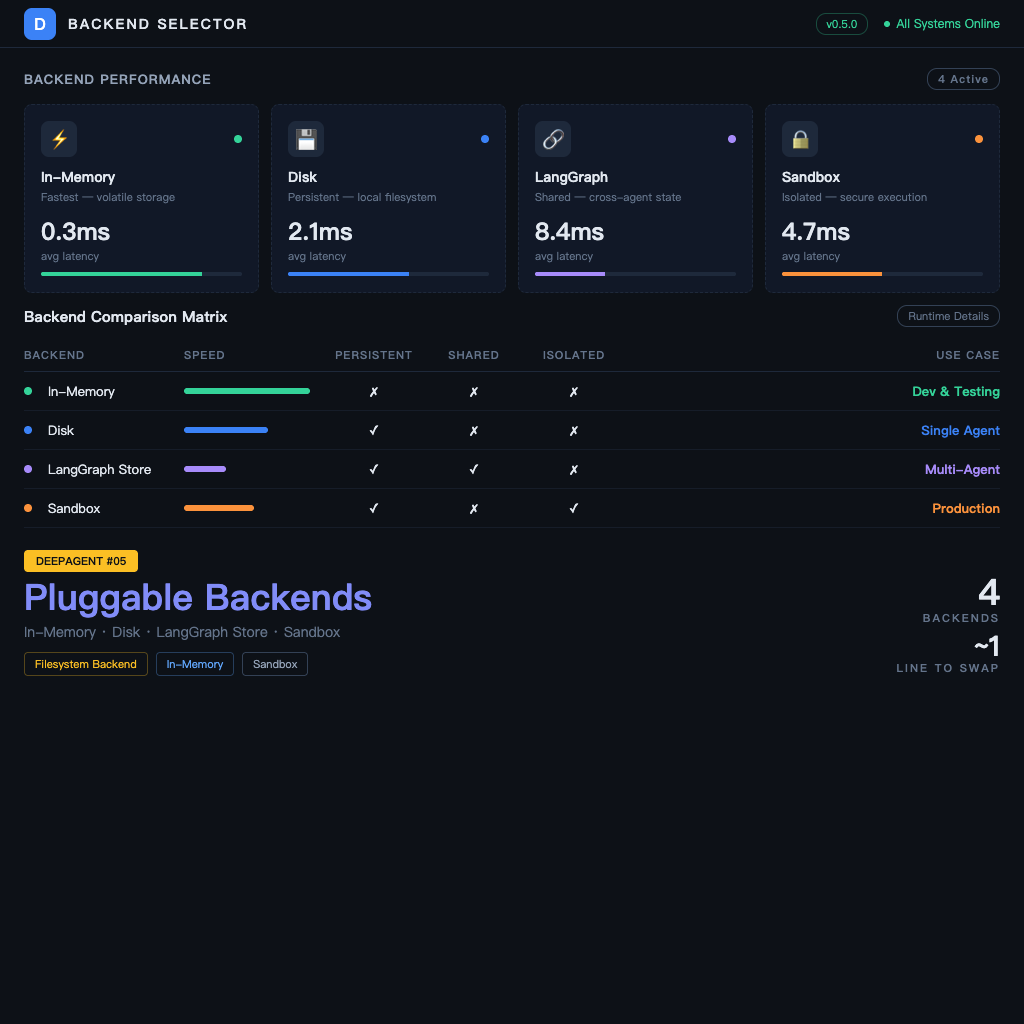
Pluggable Backends: In-Memory, Disk, LangGraph Store, or Sandbox — How to Choose
The previous article covered the agent's virtual filesystem — but what's underneath that filesystem? Where does the data actually live?
Deep Agents' filesystem uses a "pluggable backend" design — you can swap the underlying storage implementation based on your scenario. This sounds very engineering-ish, but the decision logic behind it is actually quite intuitive: it comes down to three questions — "do I need fast testing, persistent storage, or isolated execution?"
Four Backends, Four Scenarios
1. In-Memory
Fastest, lightest, zero configuration. When the agent finishes, the data disappears with it.
Best for:
- Development and testing — you don't care about the data, you just want to see the agent's behavior
- Ephemeral tasks — no need to retain intermediate files after the task completes
- Prototype validation — get the logic working first, switch to a real backend later
from deepagents import create_deep_agent
from deepagents.backends import InMemoryBackend

agent = create_deep_agent(
    tools=[...],
    filesystem_backend=InMemoryBackend(),
)
If you don't pass filesystem_backend, in-memory is the default.
2. Local Disk
Data is written to the directory you specify and persists after the agent finishes. You can inspect, edit, and back up the files with regular file tools.
Best for:
- Local development where you want to use
cator a text editor to see what the agent produced - Tasks that need persistent results, but only on a single machine
- Debugging — just browse the folder to see what the agent did
from deepagents.backends import LocalDiskBackend

agent = create_deep_agent(
    tools=[...],
    filesystem_backend=LocalDiskBackend(base_dir="./agent_workspace"),
)
3. LangGraph Store (Cross-Thread Persistence)
Data lives in LangGraph's Memory Store, accessible across threads and sessions. Primarily used for long-term memory scenarios (covered in depth in the next article), but it can also be used as a standalone filesystem backend.
Best for:
- Agent needs to retain working state across different conversations
- Multiple agents need to share the same filesystem
- Tasks may be interrupted, with the next conversation picking up where it left off
from langgraph.store.memory import InMemoryStore
from deepagents.backends import LangGraphStoreBackend

store = InMemoryStore()  # or swap for PostgresStore or other persistent implementations

agent = create_deep_agent(
    tools=[...],
    filesystem_backend=LangGraphStoreBackend(store=store),
)
4. Sandbox (Isolated Execution Environment)
Both the agent's filesystem and code execution run in an isolated environment — supports Modal, Daytona, and Deno.
Best for:
- The agent needs to execute user-provided code (can't run directly on your machine)
- Need to isolate different tasks' execution environments to prevent interference
- Cloud deployment requiring elastic compute resources
from deepagents.backends import ModalBackend  # or DaytonaBackend, DenoBackend

agent = create_deep_agent(
    tools=[...],
    filesystem_backend=ModalBackend(),
)
Sandbox backends are more complex to configure — they require accounts and setup on the corresponding platform — but security isolation and elastic compute are their core strengths.
Selection Matrix
| Requirement | Recommended Backend |
|---|---|
| Development and testing | In-Memory (default) |
| Local persistence, easy debugging | Local Disk |
| Cross-session state retention | LangGraph Store |
| Need to execute untrusted code | Sandbox |
| Multiple agents sharing a filesystem | LangGraph Store |
| Cloud deployment + elastic compute | Sandbox |
Can Backends Be Combined?
Yes — Deep Agents supports a Composite backend that routes different files to different backends based on path or rules:
from deepagents.backends import CompositeBackend

agent = create_deep_agent(
    tools=[...],
    filesystem_backend=CompositeBackend(
        backends={
            "/tmp/": InMemoryBackend(),              # temp files use memory
            "/results/": LocalDiskBackend("./output"),  # final results go to disk
        }
    ),
)
This design is very useful for complex tasks: temporary data uses memory (fast), final results worth keeping go to disk (persistent), without having to choose the same backend for all data.
Backend Migration Strategy: From Development to Production
Recommended migration path:
- Prototype stage: In-Memory — zero configuration, get the logic right first
- Local development: Local Disk — inspect agent output files directly
- Integration testing: LangGraph Store — test cross-session behavior
- Production deployment: depends on needs — LangGraph Store for SaaS, Sandbox if code execution is needed
The API is the same across backends — switching only requires changing the filesystem_backend parameter, nothing else needs to change.
One Important Note
Sandbox backends are powerful, but they don't mean "let the agent access the internet and do anything" — the Sandbox controls execution isolation, not network access control. If you need to restrict what resources the agent can access, that's a separate layer of security design, outside the scope of the filesystem backend.
Previous: Filesystem Tools: Manage Context with Files, Don't Let Tokens Explode Next: Subagents: Delegate Complex Tasks with the task Tool